INDUSTRY
Logistics
MY ROLE
Lead Product Designer
research, analysis
TEAM
1 designer
4 engineers
1 product manager
TIMELINE
~ 6 Weeks from research to launch
OVERVIEW
Reduce “is it broken?” anxiety during long, quiet shipment phases and cut support load without inventing fake data
PROBLEM
Imagine you have ~$500k of inventory somewhere in the atlantic
🌍You open tracking
Monday
In Transit
Tuesday
In Transit
Wednesday
In Transit

BEHIND THE SCENES
To the system, nothing is wrong. To the human, everything feels wrong.
support was flooded with “just checking” tickets even when shipments were perfectly on track. The data was accurate, but the experience felt like a black hole and every unnecessary ticket pulled ops away from real exceptions.
PROBLEM STATEMENT
I framed this as a perceived risk problem: reduce uncertainty and increase a sense of control without changing the underlying logistics.
RESEARCH
Listening to the “panic data”. I started with the loudest signal: support tickets.
300+
Support Tickets
tagged as "status check" over 8 weeks
5
Calls
with customer support / operations leads
6
Shipper Interviews
(ops managers and logistics leads)
What we heard
“The ship hasn’t moved in 3 days. is it sinking?”
“System says ‘in transit’ but last update was monday. Please confirm cargo is safe.”
85% of “is it broken?” tickets were raised before any actual delay
users weren’t questioning the data they were reacting to silence with no explanation
key insight
Silence without explanation feels identical to failure.
If we couldn’t create more tracking data, we had to create a better narrative around the data we already had.
SOLUTION
Three pillars of reassurance
I broke the solution into three pillars that work together. Each pillar had to be honest, lightweight to build, and measurable.
Human status language
Explain what states like “in transit” really means
Elastic timelines
Visually match the reality of long quiet phases
“Nothing new” notification
Proactively confirm that no news is still good news
Human status – from labels to expectations
THE ORIGINAL UI
Status: in transit
Last update: 72 hours ago
Technically true, emotionally useless.
REDESIGN
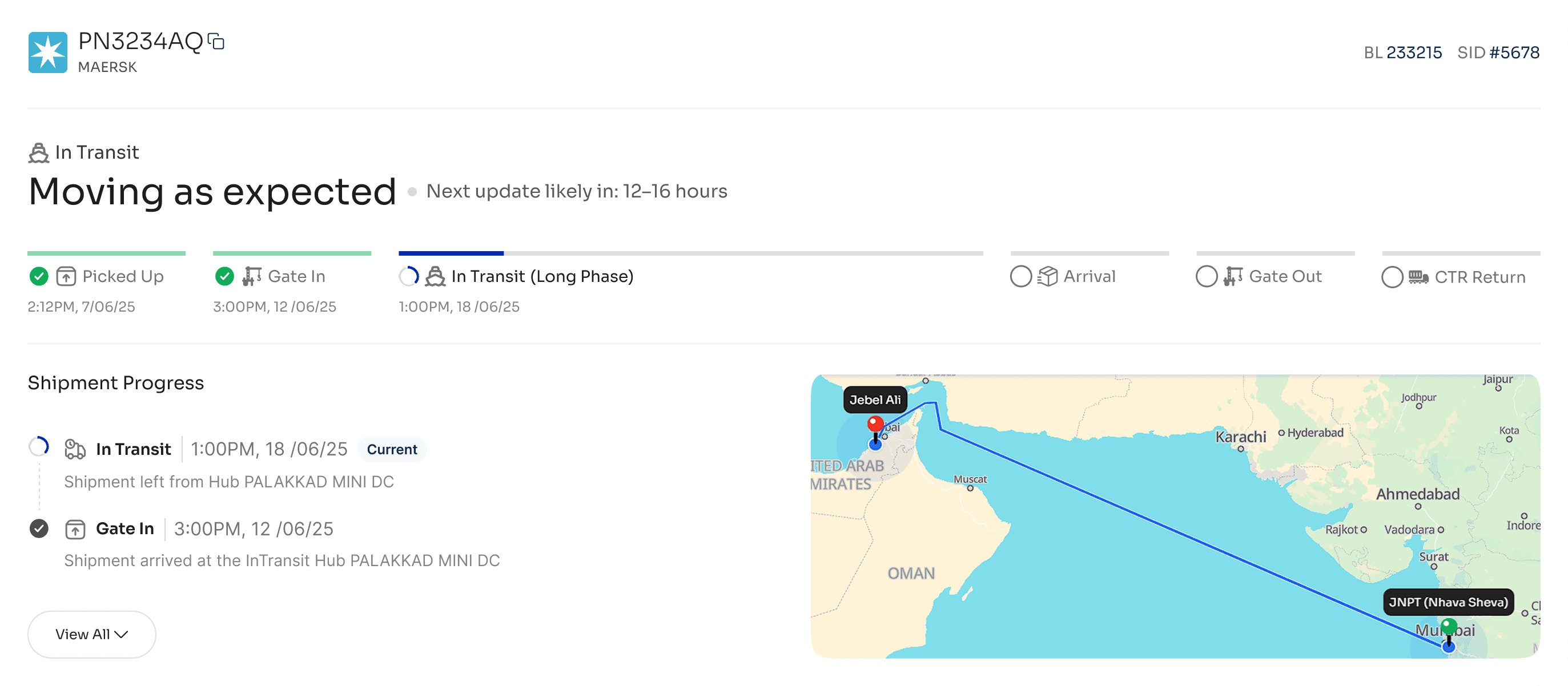
Status: moving as expected
Next update likely in: 12–16 hours
when a shipment enters a long ocean leg, we replace the generic label with an expectation setting message
Working Logic
detect “long leg” phases (e.g. planned duration > 48h)
switch to the “moving as expected” state when entering that phase
compute an update window from historical scan frequency and display it
Why this works
sets a clear expectation for when they’ll hear from us next
shifts the mental model from “nothing is happening” to “this is the quiet part, and that’s ok”
Elastic timelines – designing the “in‑between”
the original timeline treated every step as equal‑sized boxes:
pickup → gate in → transit→ arrival→ gate out→ ctr return

10‑day ocean leg looked identical to a 2‑hour truck leg. users saw a tiny “in transit” step and assumed the system was stuck.
REDESIGN
Make the timeline elastic: each segment scales with its planned duration
Included shipment progress for in-depth information
Introduce a long‑phase marker that explicitly calls out quiet stretches
This turned the scary “void” into a clearly labeled phase of the journey.
DETAILS
segments sized proportionally to expected duration, with min/max widths for readability
each segment still shows real dates and eta – we don’t hide delays
long‑phase segments include a marker and short explanation
guardrails
delays surface as a separate state with distinct visuals and copy
long quiet phases are normalized, real issues are still called out
“Nothing new” notifications – proactive calm
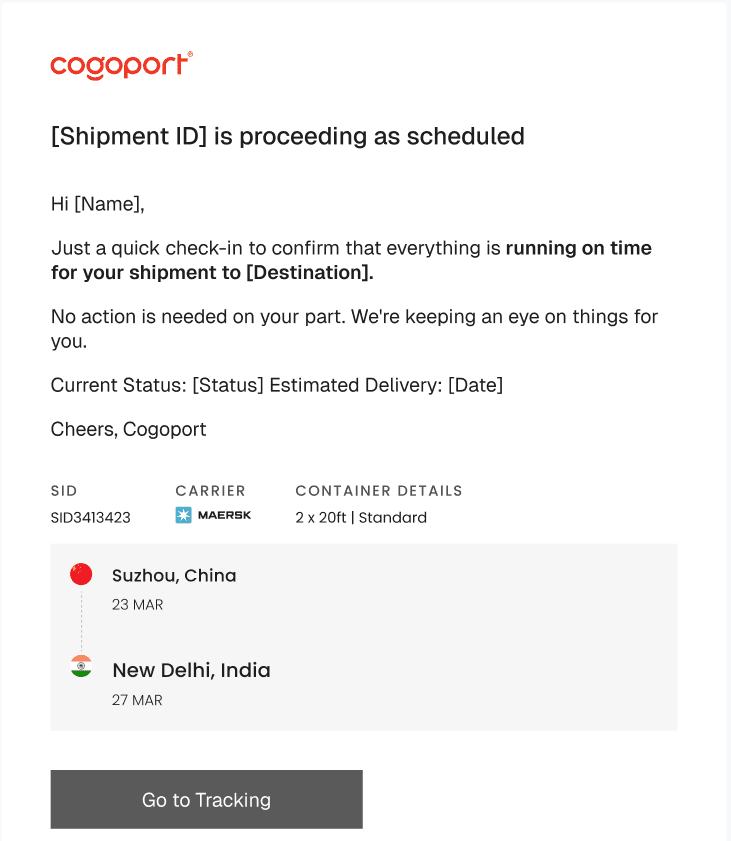
counter‑intuitively, we decided to notify users when nothing had changed. instead of forcing them to refresh and guess, we sent a short check‑in:
gaurdrails
only for legs longer than 48h
at most one “nothing new” email per 24h per shipment
skipped if any real event (delay, scan, exception) occurred in that window
why this works
this gave users a sense of being watched over, even when the system had nothing new to report.
collaboration & delivery
This wasn’t just a copy pass, it changed how we represent time and risk.
product
aligned on success metrics: reduce status‑only tickets, maintain trust, avoid masking real issues
engineering
defined long‑phase rules and notification triggers that fit existing event pipelines
support / ops
validated language and updated macros to match the new ui
impact
↓~24%
~120/week → ~92/week
in tickets tagged “status check”
support reported fewer “is it broken?” calls and more “thanks for the update” replies
↑~15%
nps score
satisfaction scores for the tracking module increased by
↓~27%
~2:10 → ~1:25
median session duration decreased. Shorter sessions here were a good sign – users trusted the first thing they saw instead of hunting around for reassurance.
what i learnt
waiting is a ux state
the “in‑between” is not empty time. the elastic timeline and long‑phase marker turned a scary void into a clearly defined phase with expectations.
predictive > reactive
telling users when they’ll hear from us next (“next update likely in…”) and proactively confirming “nothing new” reduced anxiety more than any reactive alert.
control the narrative, honestly
if you don’t explain what’s happening, the user’s brain fills the silence with disaster scenarios. by pairing honest system states with narrative context, we reduced panic without hiding real issues.